Many of TC's most-requested features are already in Onespot.
We checked the 50 most-voted ideas on Transparent Classroom's feedback forum. Onespot fully or partly covers 17 of them, including private messaging at #2, and those 17 hold about 40% of all the votes.
#
What TC schools asked for
Votes
Onespot
1
Video uploadsNext on the Onespot roadmap.
163
Coming soon
2
Internal messagingPrivate one-to-one and group chats, with email alerts and per-person preferences.
143
Built
3
Bold, italic and underline in announcementsScreen text can be bold, italic or underlined a block at a time, not word by word.
131
Partly
7
Videos and child progress in the appFamilies open a child dashboard with activity, lesson details and conference reports. TC videos aren't shown.
75
Partly
9
Print a class's emergency contactsEach child's emergency contacts and approved adults are on staff phones. There's no class printout.
70
Partly
12
Birthday remindersThe Upcoming Birthdays screen marks today's birthdays. Nothing is pushed.
59
Partly
13
Invoicing parentsOnespot Payments: invoices, recurring billing plans, and autopay by card or bank.
57
Built
15
Staff sign-inStaff clock in and out from their phones. Staff Timesheets adds up hours by pay period and flags missing or unusually long shifts.
55
Built
18
Website features in the mobile appTC dashboards, activity, reports, forms, daily tracking and health info are in the Onespot app.
50
Partly
20
Parents send notes to guidesDirect messages to teachers at any time of day.
46
Built
21
Parent-teacher conference sign-upSignUpJester scheduling, opened from the Onespot admin menu.
31
Built
25
Parents report absencesAn absence form in the app that also covers late arrivals and early dismissals.
28
Built
28
Attendance in the mobile appAftercare check-in and check-out from the app. Aftercare only, not TC's daily attendance.
25
Coming soon
29
Parents comment on notes and photosComments on Onespot feed posts. Not on TC photos.
25
Partly
30
Scheduled announcementsSchedule any announcement, or set it to repeat.
25
Built
34
Calendar for staff and familiesEvent calendars, each shown only to the groups you pick, with Google Calendar sync.
23
Built
35
Distance drop-off in the mobile appFamilies see their TC drop-off PIN right in the Onespot app.
23
Built
38
Automatic absence alertsEmail alerts when a family submits the absence form, set up by Onespot. Not built into the app yet.
22
Partly
39
Full app functionalitySame as #18: most TC views a family or teacher needs are in the Onespot app.
22
Partly
45
Head count in attendanceLive head count by room in the TC Attendance & Hours report.
20
Coming soon
Transparent ClassroomTC-specific requests
The other 30 are about TC's own attendance, forms, reports and lesson planning.
*Note: some of these may already be completed.
#4Behavior tracking
#5Bulk-update attendance
#6Anecdotal observation log
#8Parents edit accepted forms
#10Reason for rejecting a form
#11Mark a lesson as reintroduced
#14Parent e-signature on conference reports
#16Internal forms parents don't see
#17Health checks in attendance
#19Roster sorted by last name
#22Year plan
#23Record concentration after the fact
#24Track photos shared per child
#26Director approval for incident reports
#27Sunscreen log
#31Auto plan
#32Subject-area grid in lesson plans
#33Health form expiration reminders
#36Alerts when parents change contact info
#37Tab between portfolios
#40Weekly record of lessons given
#41Progress report comments by term
#42Recurring practice and lessons
#43Tag children and lessons in the app
#44Copy lessons from other schools
#46Reorder report templates
#47Notes on the planning page
#48Name, date and colors on printed lessons
#49Bulk archive forms
#50One-click photo rotation
Roadmap
What's new and what's next for Onespot.
LiveRecently launched
Redesigned group chatsDid we rebuild WhatsApp?
Scheduling for every teacher and adminSignUpJester conference and event sign-ups.
Onespot SitesBeautiful websites designed by Onespot that connect into your mobile app.
Send to specific peopleAnnouncements can go to a hand-picked list.
Polls in chats and feedsAsk families a question and watch the votes come in.
Job listings (beta)Schools publish Montessori.jobs listings from Onespot.
NextComing next
Video uploadsTransparent Classroom’s #1 request, with 163 votes.
Ratios and attendanceLive head counts by room, staff ratios and hours per child.
Enrollment CRMTrack prospective families from first inquiry to enrolled.
Aftercare check-in and check-outCheck children in from the app, with hours and invoices worked out for you.
Invoice charge remindersA heads-up to families before an invoice is charged automatically.
Chats that follow your groupsChat members stay in sync as families come and go.
Messaging
Families and staff talk inside the app.
~7,400
Announcements in the past year
~1M
Deliveries to families and staff in the past year
~1,300
Group chats since the October redesign
Announcements per week
Onespot Payments
Payments are growing fast.
Monthly payment volume
The total schools collect from families through Onespot Payments each month. Lately that's about $1.7M a month. Volume typically dips over the summer, then climbs again in the fall.
+220%year-over-year growth in September volume
~7%average growth per month over the past year
ActualTrendLikely range
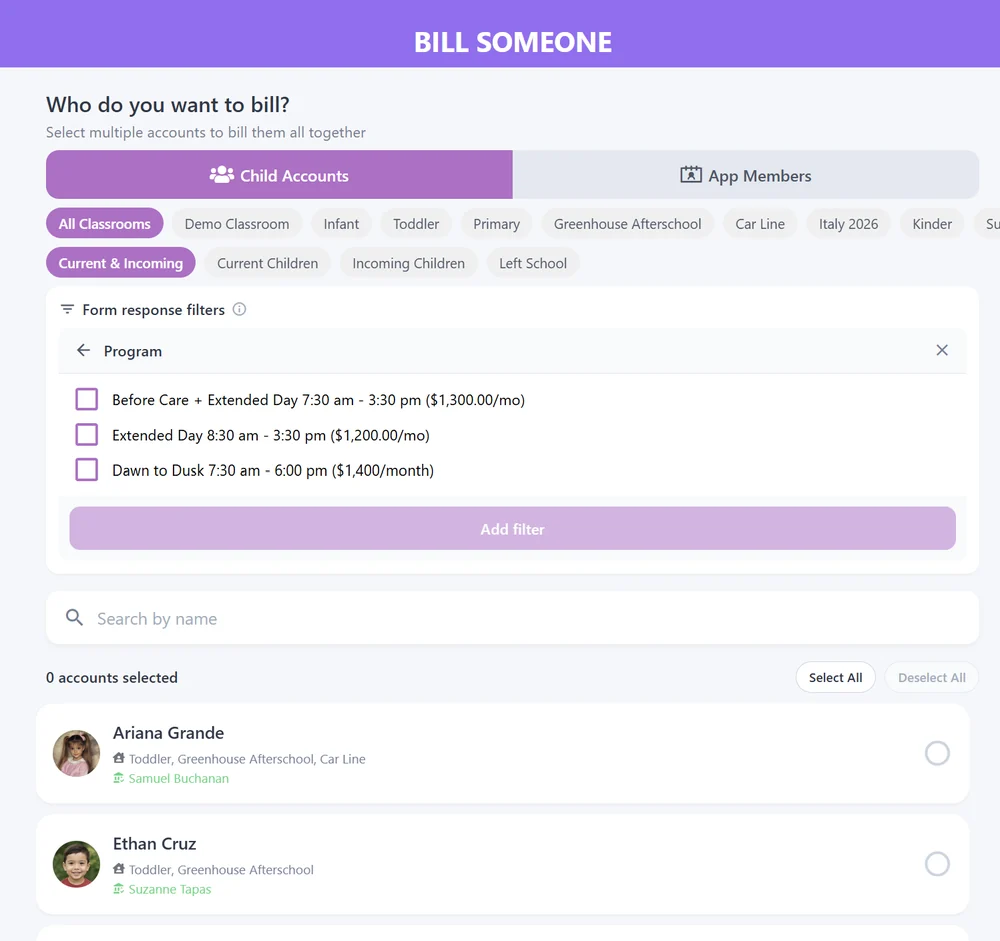
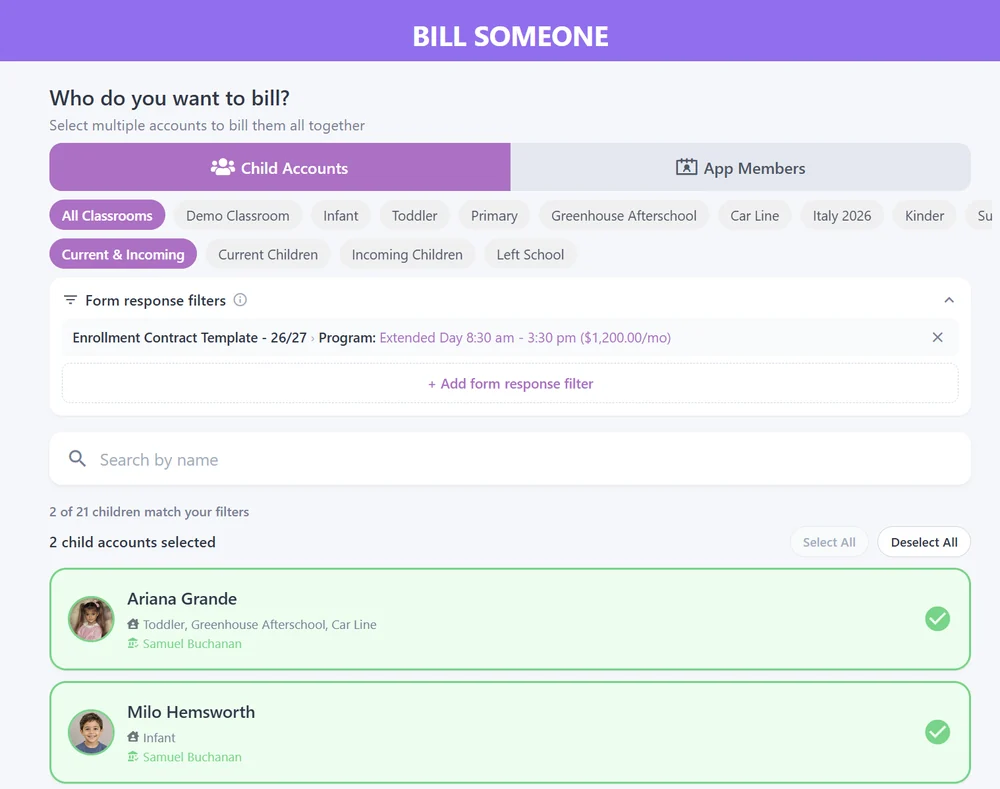
Bill families straight from their TC form answers.
As an added feature to Onespot billing, we added billing straight from Transparent Classroom forms. Pick a question from a TC form and the answers to bill for, and Onespot selects every child whose family gave one of those answers.
We haven't built a way to measure how often schools use this yet, but the feedback from schools has been encouraging. Some didn't know TC had forms, and others had stopped using them because they didn't connect to billing. Now that forms can drive billing, many schools we've talked to are taking a fresh look at Transparent Classroom forms and finding new ways to use them.
Coming next
Staff ratios, live for every room.
TC Attendance & Hours reads drop-offs and pick-ups from Transparent Classroom and shows who's in each room, whether staffing meets the required ratio, and which rooms are full. Try adding or removing staff below.